
Support mSecure
Latest version crashing on iPhone
I have the same issue, as soon as WiFi sync starts iOS and iPADOS devices all crash. I have an open ticket on this issue. If I disable the sync on main computer all devices open with no issues.
Same here. I also have been a happy customer for more than 14 years.
iPhone iOS 26.3.1. mSecure 7.0.0
It works fine if Airplane mode is on, otherwise it crashes while syncing with Dropbox.
I have same issue, works with mSecure Cloud but I want to use Dropbox
I cant send a backup by email either!!
Hi Everyone,
We will be releasing a new update of the mSecure 7 app that could possibly fix this issue. Keep an eye on the version number you are seeing to see if this update has been applied to your device this week. The version number should be 7.0.1. A work around for this issue for now is to switch your syncing type to mSecure Cloud on the device that currently does not crash. This should then allow you to access your data on all devices without a crash occurring. We are sorry for the inconvenience this has been for you all.
As you suggested I set the working machine (Win 11 main computer) to sync using mSecure cloud. The sync starts and after about one minute I get this error. Tried it multiple times, same error each time.
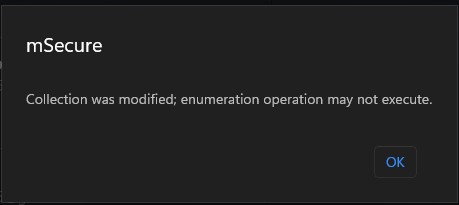
Update resolved issue, thank you!
Rick
iPhone 16 Pro, iOS 26.5
I opened mSecure this morning to look up a password. After faceID I was prompted for the first time to "Allow Safari Autofill". I declined and went to the password list. After 2 seconds, the app crashed/vanished. I reopened and tried again, same behavior. I tried different settings combinations, but it always crashes after 2 seconds.
I then deleted and reinstalled the app. It synced the passwords and stayed working. But the next time I closed and reopened it, it crashed after 2 seconds. It may have something to do with syncing because I see the "Syncing..." message at the bottom just before the crash.
Also, it doesn't always fully crash as the app seems to still be in the active apps list when I swipe up. But if I select it, it crashes after 2 seconds.
I've relied on mSecure for many many years.
HELP!
2 personnes ont le même problème